
How to play MARKET ARENA in your first five minutes
The opening scenario introduces the AI market. In the main game, you start with 10 million yen in virtual funds and trade UNIVERS/COIN first.
The game interface and voices are in Japanese. The labels below match the in-game controls.
Find the chart and order panel
Open Trade (取引). The instrument and current price sit above the chart, with the order panel below it. Each candle on the 15-second chart shows 15 seconds of game prices. The game is designed for roughly the price movement of a real five-minute candle in that time.
Open a long or short and close it
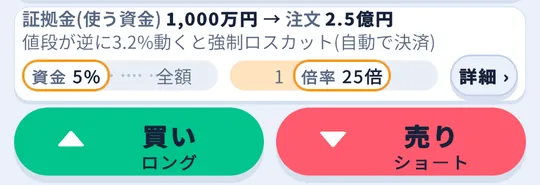
- Choose your size and multiplierThe order panel shows how much margin you put up and the order size after applying leverage. The multiplier starts at 1x.
- Tap Buy or SellBuy (買い) opens a long. Sell (売り) opens a short. Once filled, the trade appears on the position card.
- Set a stop-loss and check the resultOpen Details, then Stop-loss and Take-profit (損切り・利確), to set a price. To close manually, tap Close All (全部決済).
Review the result and the chart
The position card shows unrealized profit or loss. The result after closing includes trading fees. When a large order sets off an AI stop-loss cascade, the chart reports how many AI traders you stopped out.